Key Takeaways
- 01
Track project progress consistently to prevent delays and missed deadlines. - 02
Clear task ownership improves accountability across the entire project team. - 03
Regular progress reviews help identify risks before they grow. - 04
Visual tracking methods make project updates easier to understand. - 05
The right tracking tools improve collaboration and project visibility.
Projects rarely fail because teams lack talent. Instead, they often fall behind when people lose visibility into what is happening. One team member may say a task is almost complete, while another is waiting for feedback. Meanwhile, managers may only discover delays when a deadline is already close.
As work becomes more complex, relying on spreadsheets, emails, or verbal updates can create confusion and slow progress. A project progress tracker helps teams stay informed throughout the project lifecycle. It provides a clear view of completed tasks, pending work, deadlines, milestones, and potential risks.
As a result, teams can make decisions based on real-time information instead of assumptions. This helps keep projects moving forward. In this guide, you will learn what a project progress tracker is, why teams miss deadlines without one, how it supports project managers, and how to monitor project performance effectively.
What is a Project Progress Tracker?
A project progress tracker is a system that monitors how a project is progressing against its original plan. It records task completion, milestone achievements, deadlines, budgets, and resource allocation. Therefore, teams can understand the current project status at any time.
Unlike project planning, which focuses on defining goals and schedules before work begins, tracking focuses on monitoring execution. It helps teams compare planned progress with actual performance. As a result, potential issues can be identified before they become major problems.
A project tracking tool makes this process easier by automatically updating project data and displaying progress visually. This also keeps stakeholders informed without relying on constant manual reporting.
Why Teams Fall Behind Schedule Without One?
Many project delays begin with small communication gaps rather than major mistakes. Without proper tracking, teams may discover problems too late to prevent missed deadlines. The following issues are common causes of schedule delays.
1. Unclear Project Status
Team members may describe progress differently, making it difficult to understand the actual project health.
Statements like “almost done” can hide unfinished work and unexpected blockers. Therefore, a shared progress view is important for accurate project tracking.
2. Scope Keeps Expanding
New requests are often added during execution without reviewing timelines or available resources.
Although individual changes may appear small, they can increase workloads over time. As a result, project completion may be delayed.
3. Limited Visibility Across Teams
Managers may not easily identify blocked tasks or dependencies between different teams.
Consequently, important issues can remain unnoticed until they begin affecting other activities.
4. Too Many Status Meetings
Teams can spend valuable time explaining updates instead of completing meaningful work.
Many discussions also repeat the same information because no shared tracking system exists. This can make project communication less efficient.
When these issues happen repeatedly, schedules become unpredictable. A structured tracking process provides clear visibility and helps prevent delays before they become difficult to manage.
How Does a Progress Tracker Help Project Managers?
Project managers are responsible for keeping work on schedule while balancing resources, timelines, budgets, and stakeholder expectations.
A reliable tracker provides the information managers need to make informed decisions throughout the project lifecycle.
1. Provides Real-Time Visibility
Managers can instantly view completed, ongoing, and delayed tasks without requesting manual updates.
As a result, they can make faster decisions and maintain better project oversight.
2. Detects Risks Early
Delayed tasks and resource conflicts become visible before they affect major milestones.
Therefore, managers can take action earlier and reduce the chances of larger project setbacks.
3. Creates Accountability
Every task can have a clearly assigned owner and defined deadline.
This helps team members understand their responsibilities. At the same time, managers can follow progress more effectively.
4. Improves Resource Allocation
Workloads become easier to balance when managers can see individual capacity.
As a result, resources can be reassigned before team members become overloaded.
5. Strengthens Stakeholder Communication
Accurate progress reports replace assumptions during project reviews.
Therefore, stakeholders receive reliable updates based on actual project data.
6. Supports Better Decisions
Managers can rely on measurable project information instead of opinions or estimates.
This improves planning adjustments throughout the project lifecycle and supports more informed decisions.
How to Track Project Progress?
Successful tracking begins with a clear process instead of simply choosing software.
Teams that follow consistent tracking methods can respond to changes more quickly. They can also keep projects aligned with business goals.
1. Define Clear Goals and Deliverables
Every project should begin with measurable objectives and expected outcomes.
Clear goals make it easier to evaluate progress throughout execution and determine whether the project is moving in the right direction.
2. Break the Project into Smaller Tasks
Large projects become easier to manage when divided into milestones and individual activities.
Smaller tasks also improve tracking accuracy because progress can be measured more consistently.
3. Assign Ownership
Each task should have one responsible owner.
Clear accountability reduces confusion and helps everyone understand who is responsible for delivering each activity.
4. Create a Baseline Timeline
Establish deadlines, milestones, and budgets before work begins.
This baseline becomes the reference point for measuring actual performance throughout the project.
5. Select the Right Platform
Choose a solution that matches your team’s workflow and collaboration needs.
The right project tracking software should simplify updates instead of creating additional administrative work.
6. Review Progress Regularly
Daily standups and weekly reviews help teams identify issues before they become major delays.
In addition, regular reviews keep priorities aligned with project objectives.
7. Adjust Based on Real Data
Tracking is valuable only when the collected information leads to action.
Therefore, update schedules, redistribute resources, or revise priorities whenever project data indicates a need for change.
Methods for Tracking Project Progress
Every project is different, so there is no single tracking method that works for every team.
The right approach depends on your project size, goals, and workflow. For this reason, combining multiple methods can provide a more accurate view of project health.
1. Task Completion Rate
Measuring completed tasks against the total number of assigned tasks shows overall project progress.
This simple metric helps managers understand whether work is moving at the expected pace.
2. Milestone Tracking
Milestones represent important checkpoints that indicate major phases of a project have been completed.
Reviewing milestones helps teams confirm that they are progressing according to the planned timeline.
3. Time Tracking
Comparing actual time spent with estimated time highlights productivity trends and planning accuracy.
It can also help managers identify tasks that consistently require more effort than expected.
4. Status Categories
Organizing tasks as Not Started, In Progress, Blocked, or Complete gives everyone a clear understanding of current work.
These categories improve communication and make daily reviews more productive.
5. Gantt Charts
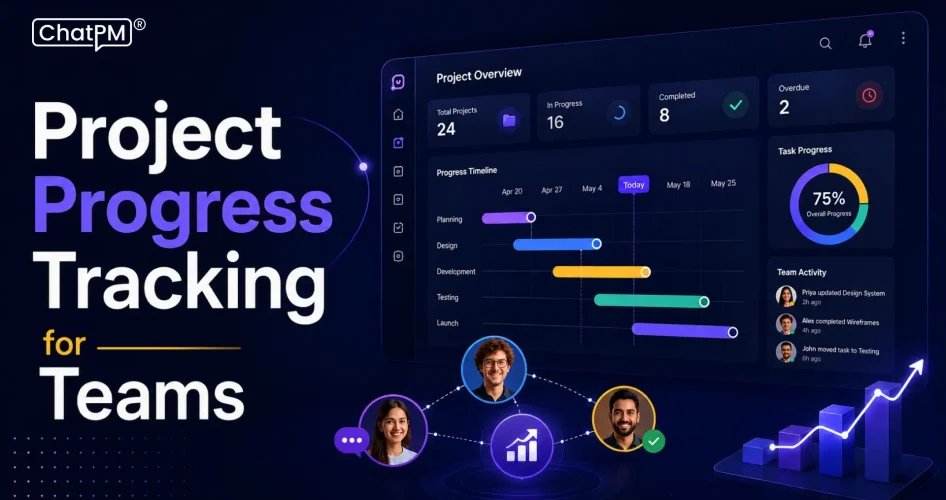
Gantt charts display project schedules, task dependencies, and deadlines in a visual timeline.
As a result, managers can quickly identify delays that may affect upcoming activities.
6. Kanban Boards
Kanban boards organize work into different workflow stages for better visibility.
Teams can monitor task movement and quickly identify bottlenecks that may slow overall progress.
7. Project Dashboards
Dashboards bring together key project metrics in one place using charts and reports.
Therefore, project managers and stakeholders can monitor progress without reviewing multiple documents.
Key Features to Look for in a Project Management Tracker
Choosing the right project management tracker makes monitoring projects easier and can improve team productivity.
- Multiple Project Views: View projects in list, Kanban, Gantt, or calendar formats.
- Real-Time Updates: Instantly see task changes and project progress across the team.
- Automated Reporting: Generate accurate reports and dashboards without manual effort.
- Resource Management: Balance workloads to improve productivity and avoid resource overload.
- Collaboration Tools: Keep communication, files, and task updates in one place.
- Deadline and Risk Alerts: Receive timely alerts before delays or risks affect the project.
How ChatPM Helps You Track Project Progress?
Managing projects becomes easier when tracking, reporting, and communication happen in one platform.
ChatPM combines AI-driven insights with real-time project visibility. As a result, teams can stay informed and work toward delivering projects on schedule.
1. AI-Powered Status Summaries
ChatPM automatically generates clear project updates using real-time project data.
Managers can quickly understand overall progress without collecting manual reports from every team member.
2. Interactive Power BI Dashboards
Built-in dashboards provide live insights into project performance, timelines, workloads, and risks.
Therefore, teams and stakeholders have access to project information that supports faster decision-making.
3. Task, Risk, and Issue Tracking
ChatPM monitors tasks, project risks, action items, and issues from a single workspace.
This centralized view helps managers identify blockers before they affect delivery timelines.
4. Microsoft Teams Integration
Team members can receive updates, manage tasks, and collaborate directly within Microsoft Teams.
As a result, communication stays connected to project activities and unnecessary context switching is reduced.
Ready to Keep Every Project on Schedule?
A project progress tracker gives teams the visibility needed to manage tasks, milestones, and deadlines with confidence.
If you’ve ever wondered how a progress tracker helps project managers, the answer is simple. It improves decision-making, accountability, and collaboration.
ChatPM simplifies project tracking with AI-powered insights, real-time dashboards, automated reporting, and seamless collaboration.
It helps project managers monitor progress, identify risks early, and make informed decisions that keep projects on schedule from start to finish.