Key Takeaways
- 01
Gantt charts simplify complex project planning and scheduling. - 02
Visual timelines improve project tracking and task coordination. - 03
Task dependencies help teams avoid workflow bottlenecks efficiently. - 04
Resource allocation becomes clearer with structured project timelines. - 05
Regular updates keep projects aligned with changing priorities.
Project delays, missed dependencies, and unclear timelines can quickly impact delivery performance, even when teams are tracking the right KPIs. This is where understanding what is Gantt chart becomes important for modern project planning. It helps project managers visualize tasks, deadlines, dependencies, and progress in a structured timeline for better execution and coordination.
But how do we create a real-time project plan that keeps teams aligned, tracks progress efficiently, and adapts to changing priorities? Don’t worry, we’ve got you covered. In this blog, we will explain how Gantt charts work, why they matter in project planning, and how businesses can use them to manage projects more effectively. So, let’s keep reading further!
What is Gantt Chart?
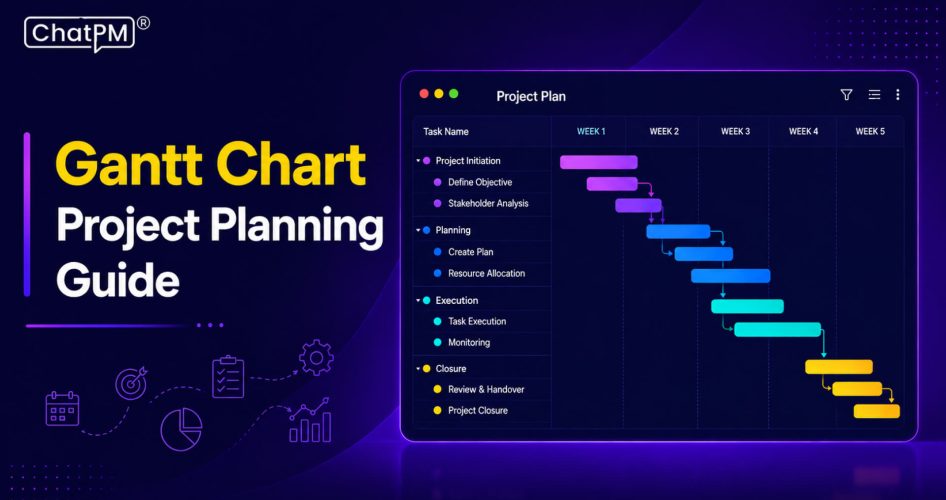
The Gantt chart was developed by Henry L. Gantt, and it is a project management tool that maps tasks against a timeline, showing start dates, end dates, and overall progress in one view. The left side lists all tasks while the right side displays horizontal bars representing each task’s duration across the project schedule.
This visual format makes it easy to track what is completed, what is in progress, and what is coming up next. Teams rely on Gantt charts to manage deadlines, monitor milestones, and understand task dependencies, giving everyone a clear picture of how the project is moving forward.
What is Gantt Chart Used For?
Project managers turn to Gantt charts for far more than scheduling. The following breakdown covers the core functions that make this tool relevant across industries and team sizes.
1. Project breakdown
Gantt charts split large projects into scheduled tasks with clear dates, owners, and milestones. Every team member knows what is happening, in what order, and who is responsible.
2. Task dependencies
Some tasks cannot start until others finish, and Gantt charts make that visible. This helps multi-team environments catch bottlenecks before they disrupt the project flow.
3. Resource management
Gantt charts consolidate timelines, responsibilities, and objectives into one shared view. Managers can assign the right people to the right tasks and adjust as priorities shift.
4. Progress tracking
As tasks are completed, Gantt charts show how the project is tracking against the original schedule. Milestones and completion percentages help teams spot delays early and course correct fast.
5. WBS integration
A Work Breakdown Structure defines scope, and pairing it with a Gantt chart adds timelines, ownership, and dependencies. Together, they turn high-level goals into an actionable, day-to-day execution plan.
Key Components of Gantt Charts
1. Project Timelines: Display task schedules from start to completion.
2. Task Visualization: Show workflows and dependencies across project phases.
3. Milestone Tracking: Measure progress and ongoing task completion percentages.
4. Task Dependencies: Connect tasks requiring completion before proceeding further.
5. Resource Support: Provide tools, documents, and helpful project contacts.
Key Advantages of Gantt Charts
Understanding what is Gantt chart helps businesses manage projects with better visibility and planning accuracy. The following advantages explain why Gantt charts are widely used for tracking timelines, improving collaboration, and ensuring smoother project execution.
1. Clear Timelines
Gantt charts turn complex schedules into simple visual timelines. Teams can quickly understand project phases, deadlines, and overall progress.
2. Task Dependencies
They clearly show which tasks depend on each other. This helps teams avoid delays and maintain smooth project workflows.
3. Team Accountability
Assigned tasks improve ownership and responsibility across teams. Progress tracking also increases transparency during project execution.
4. Resource Planning
Managers can balance workloads more effectively with Gantt charts. This prevents resource overuse and improves team productivity.
5. Risk Identification
Gantt charts help identify scheduling conflicts before they become major issues. Teams can make faster adjustments to keep projects on track.
6. Better Communication
They provide a shared view of tasks, deadlines, and responsibilities. This reduces confusion and improves collaboration between stakeholders and teams.
Disadvantages At a Glance
1. Large projects often make Gantt charts overcrowded and confusing.
2. Task durations rarely reflect actual workload or required effort.
3. Constant project changes demand frequent manual chart updates continuously.
4. Agile workflows struggle with rigid and static Gantt structures.
5. Complex dependencies create visual confusion across interconnected project tasks.
How To Make a Gantt Chart?
Creating a Gantt chart helps teams organize tasks, timelines, and project dependencies more effectively. The following steps explain how to build a structured Gantt chart for smoother project planning and execution.
1. Define Project Tasks
Start by listing all major tasks and project activities. Break complex work into smaller and manageable action steps.
2. Set Task Deadlines
Assign realistic start dates and completion deadlines for every task. This helps teams manage schedules and avoid unnecessary delays.
3. Track Task Dependencies
Identify which tasks rely on the completion of others. This improves workflow planning and reduces project bottlenecks effectively.
4. Assign Team Responsibilities
Allocate tasks to the right team members for better accountability. Clear ownership improves collaboration and task execution across projects.
5. Create Visual Timeline
Build a clear project timeline Gantt chart using your task data. This gives teams a complete visual overview of project progress.
6. Customize Chart View
Use colors, labels, and filters to organize important project details. Customized views make tracking milestones and priorities much easier.
7. Monitor Project Progress
Regularly update the chart as tasks move forward or change. This keeps project planning accurate and teams aligned consistently.
8. Share With Stakeholders
Share the Gantt chart with teams, clients, and stakeholders easily. Better visibility improves communication and keeps everyone informed throughout projects.
Key Steps to Use a Gantt Chart
Using a Gantt chart effectively requires proper planning and structured execution. The following steps will help you organize tasks, manage timelines, track dependencies, and improve overall project visibility with greater accuracy and control.
1. Break Down Project Tasks
Start by identifying all tasks required for project completion. A clear work breakdown structure improves planning accuracy and organization.
2. Build Project Timeline
List task durations, deadlines, and important project details carefully. A Gantt chart template helps create structured and visual project timelines.
3. Define Task Dependencies
Identify relationships between tasks before creating the final schedule. Proper dependency mapping helps avoid delays and workflow confusion later.
4. Track Critical Path
Find the sequence of tasks affecting overall project completion time. Delays in critical tasks can directly impact final project delivery.
5. Monitor Project Milestones
Track important project achievements and major delivery checkpoints consistently. Milestones provide a high-level view of project progress and performance.
6. Manage Project Resources
Allocate resources based on workload, timelines, and project requirements efficiently. Resource tracking also helps improve team productivity throughout execution.
7. Compare Planned Results
Measure actual project performance against planned schedules and estimated costs. This helps managers identify delays, budget issues, and planning gaps quickly.
Looking for a Smarter Way to Manage Projects?
Understanding what is Gantt chart is essential for businesses that want better project visibility, improved collaboration, and accurate scheduling. From managing dependencies to tracking milestones and resources, Gantt charts help teams stay organized throughout every project phase. With the right approach, they become a powerful tool for efficient project execution and planning success.
Modern teams also need smarter ways to manage communication and workflows alongside project timelines. CHATPM helps businesses streamline project collaboration, task coordination, and team productivity from one platform. Whether you are handling simple tasks or large-scale projects, CHATPM makes project management more structured, connected, and efficient.