Key Takeaways
- 01
AI helps allocate resources based on skills, workload, and availability. As a result, managers can make more informed allocation decisions. - 02
Balanced workloads help teams stay productive without unnecessary pressure. In addition, they support more sustainable team performance. - 03
AI can identify resource conflicts before they impact projects. Therefore, managers have more time to resolve allocation issues. - 04
Accurate workforce data supports better resource allocation decisions. Consequently, AI recommendations become more relevant to project requirements. - 05
ChatPM helps managers optimize resources through intelligent project insights. As a result, teams can manage workloads and changing priorities more effectively.
Effective resource allocation plays a critical role in keeping projects on track, controlling costs, and maintaining team productivity. AI Resource Allocation helps organizations assign people based on skills, availability, workload, and project requirements. In addition, it gives project managers clearer insights, helping them make informed allocation decisions while supporting efficient project execution.
Ready to take your marketing project management to the next level? Schedule a demo with ChatPM Pro today and discover how AI-powered tools can simplify planning, streamline collaboration, and help your team deliver projects faster.
Balancing workloads, deadlines, employee skills, and availability can become difficult as projects grow. However, manual planning may overlook changing priorities or overloaded team members, creating delays and productivity challenges. AI helps managers identify these issues earlier and make smarter decisions. As a result, teams can improve resource utilization while maintaining more balanced workloads. In this blog, we explore how AI can optimize teams without overloading them.
What is AI Resource Allocation?
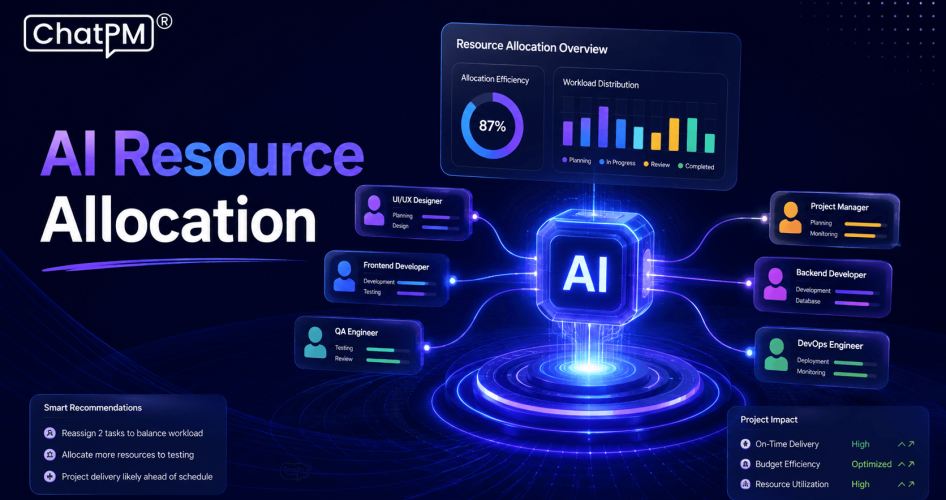
AI Resource Allocation uses artificial intelligence to help organizations assign the right people to the right projects and tasks. It analyzes factors such as employee skills, availability, workload, project priorities, and deadlines. As a result, project managers get a clearer view of team capacity and can make faster, data driven resource decisions.
Workforce planning AI takes this approach further by continuously analyzing workforce data and identifying resource gaps or potential conflicts. Instead of relying entirely on spreadsheets and manual estimates, managers can use AI driven insights to understand where resources are needed most. Therefore, this supports better planning, improves resource utilization, and helps teams maintain sustainable workloads.
Why Traditional Resource Allocation Can Overload Teams?
Traditional resource allocation often depends on spreadsheets, manual updates, and manager experience. While these methods can work for smaller projects, they become difficult to manage as teams, projects, and deadlines increase. As a result, limited visibility can make it harder to recognize workload issues before they affect project performance.
1. Manual planning can miss workload changes
Team availability can change quickly, making static allocation plans outdated. Therefore, managers may need to update assignments frequently to keep workloads aligned with current project requirements.
2. Uneven task distribution creates pressure
Some employees may receive too many tasks while others remain underutilized. As a result, uneven workloads can increase pressure on some team members while available capacity remains unused elsewhere.
3. Limited capacity visibility affects decisions
Managers may struggle to see each employee’s workload across multiple projects. In addition, limited visibility makes it harder to identify capacity gaps before assigning new work.
4. Changing priorities create resource conflicts
New deadlines or urgent tasks can disrupt existing assignments and increase team pressure. Consequently, managers may need to reallocate resources quickly to prevent conflicts from affecting project progress.
5. Last minute allocation causes delays
Assigning resources reactively can create bottlenecks and leave teams with unrealistic workloads. Therefore, proactive resource planning can help organizations reduce delays and maintain more balanced assignments.
How AI Optimizes Project Resource Management?
AI Resource Allocation helps project managers make faster and more informed decisions about team assignments. It analyzes project requirements, employee capacity, skills, and workloads to recommend suitable resource allocation. As a result, managers can respond to changing project needs while keeping workloads more balanced.
1. Analyzing Team Capacity and Availability
AI identifies available resources and employees who are already handling heavy workloads. Therefore, managers can assign tasks based on actual team capacity instead of relying only on manual estimates.
2. Matching Skills to Project Requirements
AI compares project needs with employee skills and experience. As a result, managers can assign suitable people to tasks more effectively and make better use of available expertise.
3. Predicting Resource Conflicts
AI can identify potential allocation conflicts before they affect project progress. Consequently, managers can address capacity issues early and avoid unnecessary delays.
4. Balancing Workloads
AI monitors workloads across projects and highlights uneven task distribution. In this way, managers can prevent overloading while keeping available resources productive.
Key Benefits of Workforce Planning AI
Workforce planning AI helps organizations manage people and project demands more effectively. In addition, it provides useful insights that support better resource optimization and more balanced project execution.
1. Better resource utilization
AI helps assign available resources where they can contribute most effectively. As a result, organizations can make better use of existing team capacity.
2. Balanced workloads
Managers can identify overloaded employees and redistribute tasks based on capacity. Therefore, teams can maintain more balanced workloads and reduce unnecessary pressure.
3. Improved project planning
AI provides clearer resource insights for planning upcoming projects and deadlines. In addition, these insights help managers identify resource requirements earlier.
4. Faster allocation decisions
Managers can quickly review AI driven recommendations instead of relying only on manual planning. As a result, resource allocation decisions can be made more efficiently.
5. Reduced resource conflicts
AI identifies potential shortages and overlapping demands before they disrupt project progress. Therefore, managers can adjust assignments before conflicts become larger problems.
6. Better delivery predictability
Effective resource optimization helps teams maintain realistic workloads and improve project delivery consistency. Consequently, managers can plan project execution with greater confidence.
How to Implement AI Resource Allocation Effectively?
Implementing AI Resource Allocation requires accurate data, clear processes, and continuous monitoring. Therefore, organizations should introduce AI gradually while keeping project managers involved in important resource decisions.
1. Start With Accurate Resource Data
Maintain updated information about employee skills, availability, workloads, and project assignments. As a result, accurate data helps AI provide more reliable allocation recommendations.
2. Define Resource Capacity
Set clear limits for how much work each team member can reasonably handle. This helps prevent excessive workloads and, at the same time, supports sustainable team performance.
3. Set Clear Allocation Rules
Define project priorities, deadlines, required skills, and resource preferences. Therefore, clear rules help AI recommend resources according to business and project requirements.
4. Monitor Workloads Continuously
Track resource utilization as project conditions change. As a result, regular monitoring helps managers identify overloads and allocation gaps early.
5. Integrate Project Data
Connect project schedules, task assignments, employee information, and workload data. In addition, this gives AI a broader view when making allocation recommendations.
6. Keep Managers in the Decision Loop
AI should support managers rather than completely replace their judgment. Therefore, managers can review recommendations and make adjustments based on team circumstances.
7. Review and Improve Allocations
Evaluate allocation decisions regularly to identify what is working and what needs adjustment. Consequently, continuous improvement helps organizations make AI Resource Allocation more effective over time.
Best Practices for Resource Optimization
Effective project resource management requires more than assigning people to available tasks. Instead, organizations should focus on sustainable workloads, changing project needs, and long-term team performance.
1. Avoid maximum capacity allocation
Keep some capacity available for unexpected tasks and project changes. This approach helps teams respond more easily when priorities shift.
2. Consider employee skills
Assign work based on relevant skills and experience for better productivity. As a result, employees can work on tasks that better match their capabilities.
3. Monitor changing priorities
Review allocations when project deadlines, requirements, or priorities change. Therefore, teams can adjust resource assignments before new demands create conflicts.
4. Balance workloads fairly
Distribute responsibilities according to each employee’s current capacity. In this way, organizations can reduce excessive workloads while making better use of available resources.
5. Plan for future demands
Identify upcoming resource requirements before projects reach critical stages. As a result, managers have more time to prepare teams and address potential capacity gaps.
6. Review allocation regularly
Track resource performance and adjust assignments when business needs change. Consequently, regular reviews help keep resource plans aligned with current priorities.
7. Support employee development
Consider opportunities that help team members build useful skills through suitable assignments. In addition, this can support long-term workforce development and improve resource flexibility.
Ready to Optimize Your Teams Without Overloading Them?
AI can help organizations make resource allocation more accurate, balanced, and proactive. By understanding team capacity, skills, workloads, and project demands, managers can make better decisions and reduce resource conflicts. As a result, teams can stay productive while maintaining sustainable workloads and supporting consistent project delivery across projects.
ChatPM helps project managers gain better visibility into resources, workloads, and project requirements. Its AI powered capabilities support smarter planning, allocation, and project decisions through centralized project insights. By combining project data with intelligent recommendations, ChatPM helps organizations improve resource management while keeping teams productive, balanced, and prepared for changing priorities.